How to keep long ChatGPT conversations going
Two things get in the way of a long ChatGPT session: typing "continue" again and again, and a chat that has grown too long to work in comfortably.
Two different problems that feel like one
When you work with ChatGPT on something long, such as a report, a codebase review or a book outline, two separate frictions show up. The first is the repeated "continue": a long answer stops midway, and you type "Continue" so it can carry on, then do it again a few minutes later.
The second is the chat itself. After enough messages the conversation becomes long and slow to scroll, and it gets harder to keep track of what was already decided. Both problems are real, but they call for different answers, so it helps to name them separately before choosing a fix.
The manual approach: parts and a running brief
You can handle both without any tool. For long output, ask for it in parts from the start: "Write section one only, then wait for me." You control the pace, and each reply is a complete unit instead of a cut-off one.
For a long chat, keep a running brief. It is a short note you maintain yourself: the goal, the decisions made so far, the open questions and the format you want. When the chat gets heavy, paste the brief into a new chat and carry on from there. It takes discipline, but it works anywhere and you decide exactly what is kept.
Automating the repetition with ChatSequel
If the repeated "continue" is what slows you down, ChatSequel – ChatGPT Auto Continue automates it. It is a free, ad-free browser extension by Prax9 (VERTEX FORTH) for Chrome (Chrome Web Store) and Microsoft Edge (Edge Add-ons). After ChatGPT finishes a reply, it sends the continuation message you chose, for example "Continue", after a delay you set.
You stay in control. It only works in tabs you explicitly enable, and you can pause, resume or stop it per tab. A visible countdown shows what happens next, and a continuation counter with an optional maximum keeps a run from going on forever. Choosing "unlimited" only removes ChatSequel's own continuation-count limit; it does not lift ChatGPT's usage limits.
Moving to a new chat with HANDOFF, and its limits
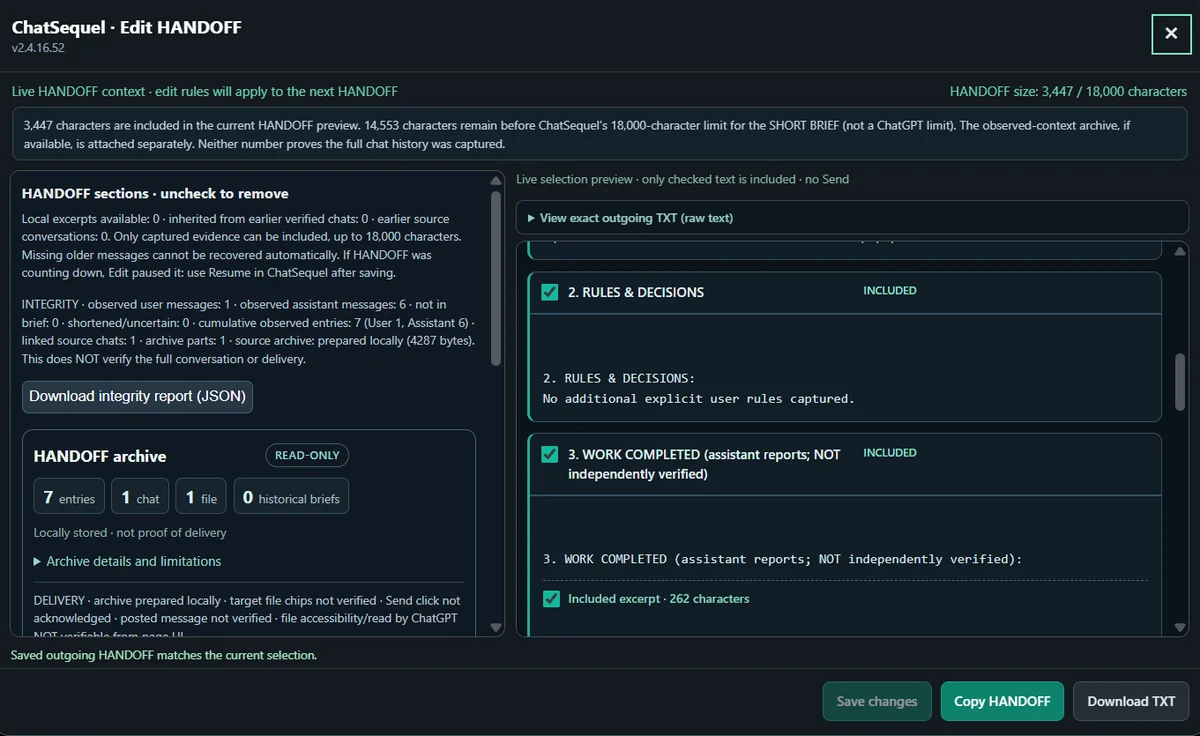
For the second problem, ChatSequel has HANDOFF. When a chat becomes too long, it prepares a transfer summary from the conversation content currently accessible on the page. You can review and edit it, choose which sections are included, and download it as a TXT file. When you authorize it, it opens a new chat and submits the summary.
The limits matter. Earlier messages that ChatGPT has not loaded, or has removed from the page, cannot be recovered, so a summary may be incomplete. Preserving all history or context is not guaranteed. That is why the review step exists: read the summary, fix what is missing, and keep your own running brief as a safety net.
The takeaway
Separate the two problems. Ask for long output in parts and keep a short brief if you prefer to stay manual. If the repetition is what hurts, an auto-continue extension removes it, and HANDOFF helps with the move to a fresh chat as long as you check the summary. Settings and saved HANDOFF text are stored locally in the browser, and no conversation content is sent to developer-operated servers. The extension supports 20 languages, including Hebrew.
ChatSequel is independent and is not affiliated with, endorsed by or sponsored by OpenAI. ChatGPT is a trademark of OpenAI.