How to run a long task in ChatGPT in parts
Long documents, larger pieces of code and big lists rarely come out well in a single request. Splitting the work into parts gives you control, and a little structure keeps it from falling apart.
Plan the parts before you start
The most common mistake is to ask for the whole thing and see what comes back. Instead, spend one message on a plan. Say what the finished result should be and ask ChatGPT to propose the parts, for example: "I need a 12-section onboarding guide. Propose a list of parts, with one line on what each covers. Do not write any of them yet."
Read that list and change it. Moving a boundary now is cheap. Moving it after four parts are written is not. Once the plan is agreed, you have a shared outline that the rest of the conversation can point back to.
Tell ChatGPT the constraints once, in the plan message: audience, tone, format and the length of each part. Repeating them loosely in every request is where parts start to drift apart.
Size the parts to the kind of task
Different tasks split differently. A long document splits along its headings: one section or chapter per part. Code splits along its structure, such as one module, one component or one function group per part, with the interfaces agreed first so the parts fit together.
Lists split by count or by category. Ask for the items in batches, and say what must not repeat: "Do not repeat items from earlier batches." If a part keeps getting cut off, it is too big. Halve it.
Keep a running checklist
Keep a simple checklist, either in the chat or in a note of your own, with one line per part and a status: not started, drafted, reviewed, final. Paste the current version back into the conversation now and then so ChatGPT works from the same state you do.
A checklist is also what lets you stop and return later. If you leave and come back tomorrow, you know exactly which part is next and what was already agreed.
If a part needs a redo, write it down as a line item instead of fixing it in passing. A redo that is written down gets done; one that is only remembered often does not.
Review after each part
Check every part before asking for the next one. Look at three things: does it match the plan, does it contradict an earlier part, and did anything get invented that you cannot verify. Fix problems while they are small, because later parts will build on whatever is already there.
When you approve a part, say so and mark it on the checklist: "Part 3 is final. Send part 4." For a thread that has grown heavy over many parts, see How to keep long ChatGPT conversations going.
A quick way to review long text is to ask for a three-line summary of each approved part and keep those summaries in your checklist. They make a later contradiction easy to spot.
Running long tasks without retyping with ChatSequel
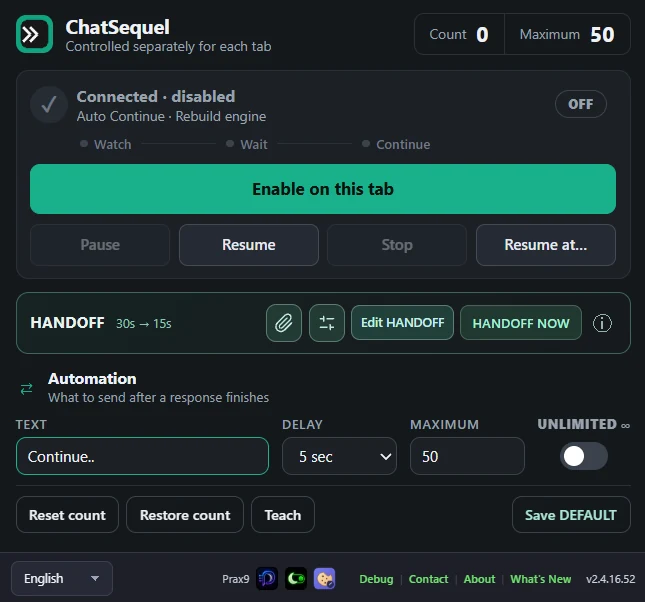
Once the plan is solid, the remaining effort is repetitive: wait, then send "Continue with the next part." ChatSequel – ChatGPT Auto Continue is a free browser extension by Prax9 for Chrome and Microsoft Edge that automates this. It continues ChatGPT responses automatically after a delay you configure.
For longer runs the controls matter. Each tab has its own enable, pause, resume and stop, so you can pause a tab to review a part and resume it when you are ready. A visible countdown shows when the next continuation is coming, and a continuation counter with an optional maximum puts a ceiling on how far an unattended run goes.
Automatic continuation does not review anything. Set a sensible maximum, keep the review step, and read what was produced before you use it.
A simple routine is to ask for the next part, let the extension handle the continuations, and come back to review when the run is finished. The delay and the continuation message are yours to set, and so is the maximum if you want one.
ChatSequel is an independent extension by Prax9 and is not affiliated with or endorsed by OpenAI.