How to start a new ChatGPT chat without losing context
At some point a long thread stops being comfortable to work in. Starting fresh is fine, as long as you carry over what matters. The way to do it is a short working brief.
When it is time to leave a thread
A thread is worth leaving when it gets slow to scroll, when you keep scrolling up to find a decision you made earlier, or when ChatGPT starts contradicting something that was settled many messages ago. None of these means the work is lost. It means the conversation has become a poor place to keep the state of the project.
The fix is not to paste the whole transcript into a new chat. It is to write down only what the next conversation needs to know.
A useful test is to ask whether you could explain the project to a colleague in a minute. If you can, you can write the brief, and the long thread is only needed for reference. If you cannot, that is a sign the decisions are buried, and writing the brief will help you as much as it helps ChatGPT.
What a working brief contains
A good brief is short enough to read in a minute and complete enough that someone with no history could continue the work. Five parts cover most projects: the goal, the decisions already made, the current state, the open questions, and the constraints.
Write decisions as decisions, not as discussion. "Use a formal tone" is useful. A paragraph about how you came to that conclusion is not. Leave out anything that is finished and no longer affects the next step.
Include the output you need, not only the topic. "A 600-word product description in a neutral tone" is a better goal than "product description". Naming the audience and the format saves a round of corrections in the new chat.
A brief template you can copy
Fill this in, keep it in a note, and update it whenever something important changes:
GOAL What I am producing, and who it is for.DECISIONS MADE - Decision, with the reason in a few words.
CURRENT STATE What exists now, and what is finished.
OPEN QUESTIONS - Question that still has to be settled.
CONSTRAINTS - Format, length, tone, things to avoid.
NEXT STEP The first thing to do in the new chat.
Keeping the brief up to date as you go is easier than reconstructing it at the moment the thread has already become hard to read.
Pasting it into the new chat
Open a new chat and start with one line of framing, for example: "This is a brief of an ongoing project. Read it, then tell me in two sentences what you understand the goal and the next step to be." Then paste the brief.
That two-sentence reply is your check. If it is wrong, you have found the gap in the brief before spending an hour on the wrong thing. Correct the brief, not the chat, so the next handoff starts from a better version.
For the related problem of constantly retyping "continue" in a long session, see How to keep long ChatGPT conversations going.
Keep the old thread open until the new one has proved itself. You may need to look something up, and it costs nothing to leave it there. Once the new chat has handled a couple of real tasks correctly, you can stop going back to the old one.
Letting ChatSequel carry the brief
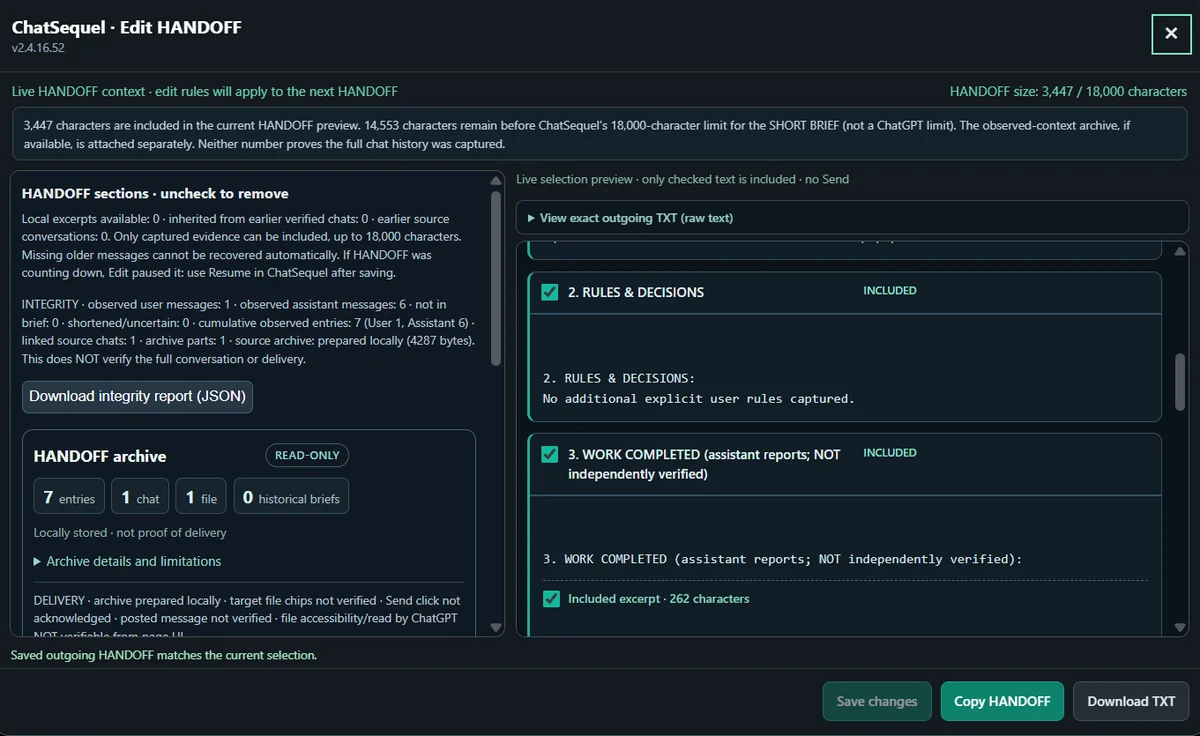
Writing the brief by hand works anywhere, but it costs time when a thread is already long. ChatSequel – ChatGPT Auto Continue is a free browser extension by Prax9 for Chrome and Microsoft Edge. Besides continuing responses automatically, it includes a context handoff workflow that carries a working brief into a new conversation when a thread gets too long.
It builds the brief from the conversation content that is accessible in the page. That is also its limit: anything ChatGPT has not loaded or has removed from the page cannot be included, so the brief can be incomplete. Review and edit it before you use it, and check it against your own notes.
Treat what it prepares as a first draft of the brief: add anything missing, remove what no longer applies, and keep the sections you rely on in your own template.
ChatSequel is an independent extension by Prax9 and is not affiliated with or endorsed by OpenAI.